Setting up an efficient cadence of weekly research conversations will re-focus your team on user problems and provide a steady stream of insights for product development.
It's a good way to test ideas and validate assumptions sooner and more often—but without increasing the administrative burden of scheduling.Setting up a weekly user research cadence accelerated our learning and built momentum behind strategic experiments. By dedicating time every week to talk to a few users, becoming more customer-focused.
The key to creating a regular cadence of ongoing user research is an efficient recruitment and scheduling process—along with a commitment to prioritize the time needed for research conversations. This is an invaluable tool for product teams (whether or not they follow a Lean process), but could easily be adapted for content strategy teams, agency teams, a UX team of one, or any other project that would benefit from short, frequent conversations with users.
The process I use requires a few hours of setup time at the beginning, but pays off in better learning and better releases over the long run. Almost any team could use this as a starting point and adapt it to their own needs.
In order to make research a priority, we started by choosing a time each week when everyone on the product team was available. Between stand-ups, grooming sessions, and roadmap reviews, it wasn’t easy to do! Nevertheless, it’s important to include as many people as possible in conversations with your users. Getting a second-hand summary of research results doesn’t have the same impact as hearing someone describe their frustrations and concerns first-hand. The more people in the room to hear those concerns, the more likely they are to become priorities for your team.
I blocked off 2 hours for research conversations every Thursday afternoon. We make this time sacred, and never schedule other meetings or work across those hours.
After my weekly cadence was set, I divided the time into four 20-minute time slots. Twenty minutes is long enough for us to ask several open-ended questions or get feedback on a prototype, without being a burden on our users’ busy schedules. Depending on your work, you may need schedule longer sessions—but beware the urge to create blocks that last an hour or more. A weekly research cadence is designed to facilitate rapid, ongoing feedback and testing; it should force you to talk to users often and to keep your work small and iterative. Projects that require longer, more in-depth testing will probably need a dedicated research project of their own.
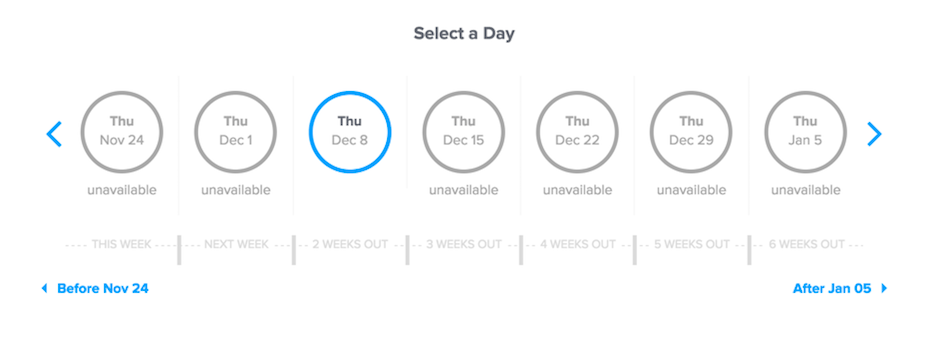
I used the scheduling software Calendly to create interview appointments on a calendar that I can share with users, and customized the confirmation and reminder emails with information about how to access our video conferencing software. (Most of our research is done remotely, but this could be set up with details for in-person meetings as well.) Automating these emails and reminders took a little bit of time to set up, but was worth it for how much faster it made the process overall.
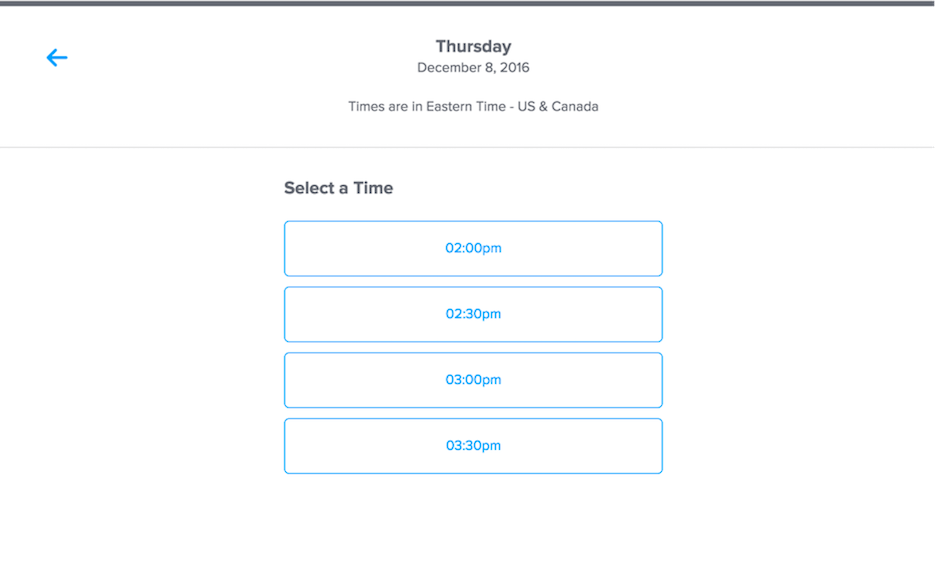
With a calendar set up and follow-up emails automated, it becomes incredibly easy to schedule research conversations. Each week, I send a short email out to a small group of users inviting them to participate, explaining that this is a chance to provide feedback that will improve our product or occasionally promoting the opportunity to get a sneak peek at new features we’re working on. The email includes a link to the Calendly appointments, allowing users who are interested to opt in to a time that fits their schedule.
Setting up appointments the first go around involved a bit of educated guessing. How many invitations would it take to fill all four of my weekly slots? How far in advance did I need to recruit users? But after a few weeks of trial and error, I found that sending 12-16 invitations usually allows me to fill all four interview slots. Our users often have meetings pop up at short notice, so we get the best results when I send the recruiting email on Tuesday, two days before my research block.
It may take a bit of experimentation to fine tune your process, but it’s worth the effort to get it right. (The worst thing that’s happened since I began recruiting this way was receiving emails from users complaining that there were no open slots available!) I can now fill most of an afternoon with back-to-back user research sessions just by sending just one or two emails each week, increasing our research pace while leaving plenty time to focus on discovery and design.
As you get comfortable with the rhythm of talking to users each week, you’ll find more and more ways to get value out of your conversations. At first, you may prefer to just show work in progress—such as mockups or a simple prototype—and ask open-ended questions to measure user reaction. When you begin new projects, you may want to use this time to research behavior on existing features—either watching participants as they use part of your product or asking them to give an account of a recent experience in your app. You may even want to run more abstracted Lean experiments, if that’s the best way to validate the assumptions your team is working from.